Rich text HTML specification
Rich text fields in Next Design can have multiple formatting values, and the formatted data for display in the UI is stored in HTML format.
However, HTML specifications are diverse and complex, so there are certain restrictions on the HTML that can be handled in rich text fields.
In order to correctly get and set HTML format values with rich text related APIs, please use HTML that conforms to the following specifications.
- For rich text related API, see Design Information > Model > Working with Rich Text Fields please.
Overall structure of HTML
Below is the overall structure of RichText HTML. Shows the relationship between elements and attributes that can be handled in Next Design's rich text.
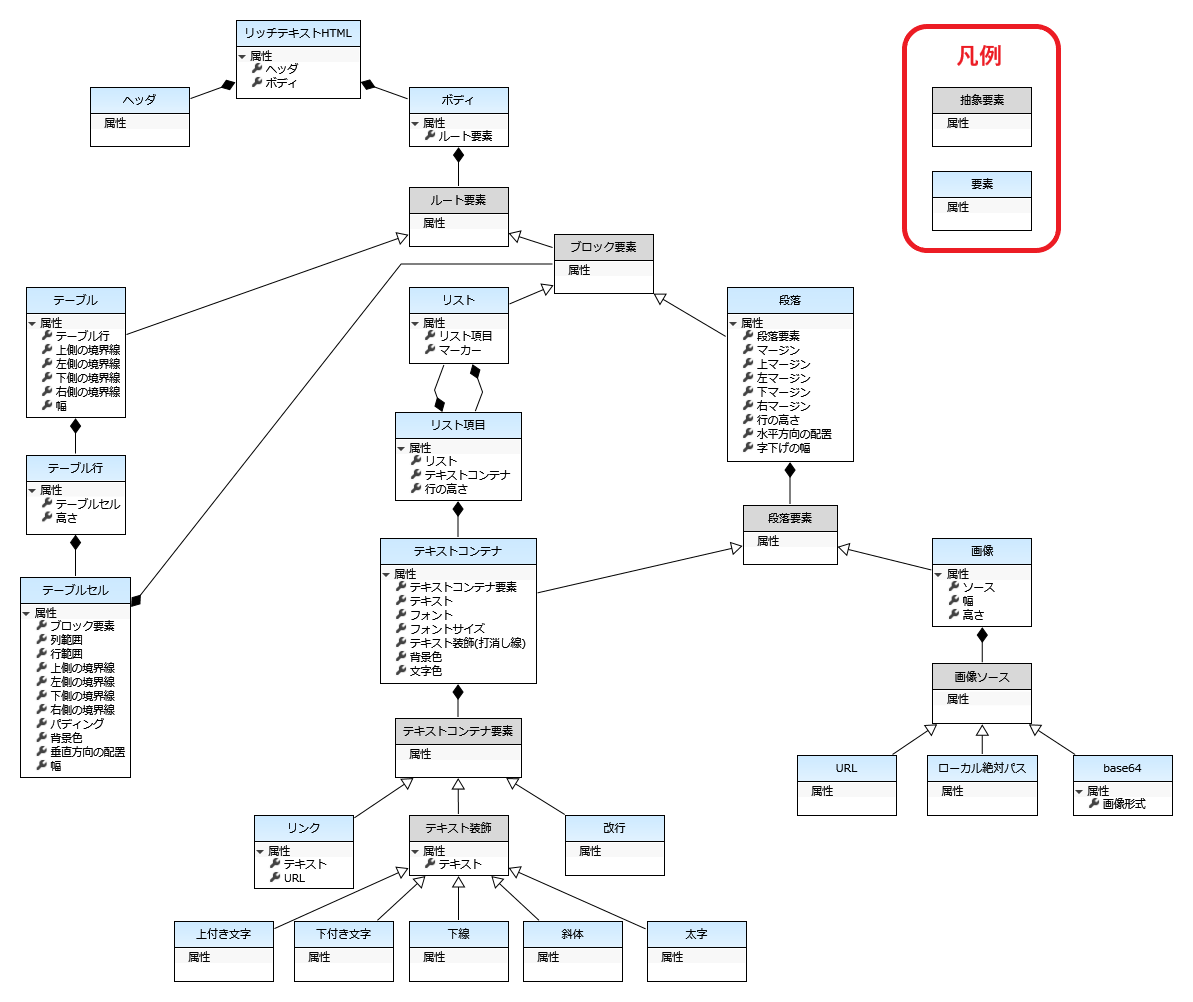
Below is a detailed explanation of the attributes that each element has.
Rich Text HTML
Rich text HTML corresponds to <html> tags.
| Attribute name | Key | Multiplicity | Range | Remarks |
|---|---|---|---|---|
| header | - | 0..1 | header | The content of the header is empty. If you want to specify styles, do so for individual HTML elements. |
| Body | - | 1 | Body | - |
Body
The body corresponds to the <body> tag.
| attribute name | key | multiplicity | range |
|---|---|---|---|
| root element | - | 1..* | paragraph list table |
Paragraph
Paragraphs correspond to <p> tags.
| Attribute name | Key | Multiplicity | Range | Remarks |
|---|---|---|---|---|
| Paragraph element | - | 1..* | Text container Image | - |
| margin | margin | 0..1 | px units | All four must be specified. |
| margin-top | margin-top | 0..1 | px units | - |
| left margin | margin-left | 0..1 | px units | - |
| margin-bottom | 0..1 | px units | - | |
| right margin | margin-right | 0..1 | px units | - |
| line-height | line-height | 0..1 | unitless number | - |
| horizontal alignment | text-align | 0..1 | left center right justify | - |
| Indent width | text-indent | 0..1 | px unit | - |
text container
Text containers correspond to <span> tags.
| Attribute name | Key | Multiplicity | Range | Remarks |
|---|---|---|---|---|
| text container element | - | 0..* | text decoration line break link | - |
| Text | - | 0..1 | String | - |
| Font | font-family | 0..1 | Single font family | Only English names of installed fonts are valid. |
| Font Size | font-size | 0..1 | px units | - |
| Text decoration (strikethrough) | text-decoration | 0..1 | line-through | - |
| background-color | background-color | 0..1 | RGB hexadecimal color color keyword 1 | - |
| Text color | color | 0..1 | RGB hexadecimal color Color keyword 1 | - |
text decoration
A text decoration corresponds to one of the following tags:
- Superscript: <sup>
- Subscript: <sub>
- Underline: <u>
- Italic: <i>
- Bold: <b>
| attribute name | key | multiplicity | range |
|---|---|---|---|
| Text | - | 1 | string |
Image
Images correspond to <img> tags.
| Attribute name | Key | Multiplicity | Range | Remarks |
|---|---|---|---|---|
| source | src | 1 | URL local absolute path base64 | - |
| Width | width | 0..1 | px Units | Image specific width. |
| Height | height | 0..1 | px Units | Image specific height. |
base64
base64 specifies the source in the format data:image/{image format};base64,{Base64 string}.
| attribute name | key | multiplicity | range |
|---|---|---|---|
| Image Format | - | 1 | png jpeg bmp |
List
The list corresponds to one of the following tags.
- Unordered list: <ul>
- Ordered list: <ol>
| attribute name | key | multiplicity | range |
|---|---|---|---|
| list item | li | 1..* | list item |
| marker | list-style-type | 0..1 | disc circle square decimal lower-latin lower-roman |
List items
List items correspond to <li> tags.
| attribute name | key | multiplicity | range |
|---|---|---|---|
| List | - | 0..* | List |
| text container | - | 1..* | text container |
| line-height | line-height | 0..1 | unitless number |
Table
Tables correspond to <table>and<tbody> tags.
| Attribute name | Key | Multiplicity | Range | Remarks |
|---|---|---|---|---|
| table row | - | 1..* | table row | - |
| top border | border-top | 0..1 | width: px units shape: none, dotted, dashed, solid, double color: RGB hexadecimal notation, color keyword1 | The three values can be specified in any order, but all values must be |
| left border | border-left | 0..1 | width: in px shape: none, dotted, dashed, solid, double color: RGB hexadecimal notation, color keyword1 | The three values can be specified in any order, but all values must be |
| bottom border | border-bottom | 0..1 | width: in px shape: none, dotted, dashed, solid, double color: RGB hex, color keyword[^1 ] | The three values can be specified in any order, but all values must be set. |
| right border | border-right | 0..1 | width: in px shape: none, dotted, dashed, solid, double color: RGB hexadecimal notation, color keyword1 | The three values can be specified in any order, but all values must be |
| Width | width | 0..1 | px units | If the width is set for the table cell, the setting value is applied with priority. |
table row
Table rows correspond to <tr> tags.
| attribute name | key | multiplicity | range |
|---|---|---|---|
| table-cell | - | 1..* | table-cell |
| Height | height | 0..1 | px units |
table cells
Table cells correspond to <td> tags.
| Attribute name | Key | Multiplicity | Range | Remarks |
|---|---|---|---|---|
| block element | - | 0..* | paragraph list | - |
| column range | colspan | 0..1 | integer | The number to merge cells horizontally. |
| row span | rowspan | 0..1 | integer | The number to merge cells vertically. |
| top border | border-top | 0..1 | width: px units shape: none, dotted, dashed, solid, double color: RGB hexadecimal notation, color keyword1 | The three values can be specified in any order, but all values must be |
| left border | border-left | 0..1 | width: in px shape: none, dotted, dashed, solid, double color: RGB hexadecimal notation, color keyword1 | The three values can be specified in any order, but all values must be |
| bottom border | border-bottom | 0..1 | width: in px shape: none, dotted, dashed, solid, double color: RGB hex, color keyword[^1 ] | The three values can be specified in any order, but all values must be set. |
| right border | border-right | 0..1 | width: in px shape: none, dotted, dashed, solid, double color: RGB hexadecimal notation, color keyword1 | The three values can be specified in any order, but all values must be |
| padding | padding | 0..1 | px units | All four must be specified. |
| background-color | background-color | 0..1 | RGB hexadecimal color color keyword 1 | - |
| vertical-align | 0..1 | top middle bottom | - | |
| Width | width | 0..1 | px units | If you set the width for multiple cells in the same column, the setting value for the cell closest to the top row is applied. |
Links
Links correspond to <a> tags.
| attribute name | key | multiplicity | range |
|---|---|---|---|
| Text | - | 1 | string |
| URL | href | 1 | string |