Git Navigator Context Menu
- This menu is displayed when you click the menu button in the Git Navigator.
- The Git Navigator Context Menu allows you to perform the following functions and view information.
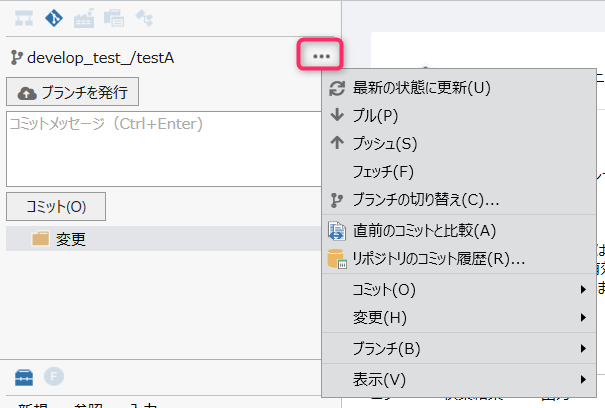
| Context Menu | Description |
|---|---|
| Update to Latest State | Updates the repository to the latest state. |
| Pull | Performs a pull. |
| Push | Performs a push. |
| Fetch | Performs a fetch. |
| Switch Branch | Displays the [Switch to Branch Selection Finder] popup, allowing you to create a branch or switch to an existing selected branch. |
| Compare to Previous Commit | Displays the difference from the previous commit. |
| Repository Commit History | Displays the commit log of the current repository in the [Commit History] dialog. |
| Commit > Commit All | Executes all commits with the entered commit message. |
| Commit > Undo Last Commit | Undoes the previous commit. |
| Changes > Stage All Changes | Stages all changed files. |
| Changes > Unstage All Changes | Unstages all changed files. |
| Changes > Discard All Changes | Discards all changed files. |
| Branch > Create Branch | Displays the [Enter New Branch Name] popup. Creates a branch with the name entered in the popup and switches to that branch. |
| Branch > Merge Branches | Displays the [Select Branch to Merge To Finder] popup. Merges the branch selected in the popup. |
| Branch > Cancel Merge | Cancels the merge and reverts to the previous commit. |
| Branch > Rename Branch | Displays the [Enter New Branch Name] popup. Renames the branch to the name entered in the popup. |
| Branch > Delete Branch | Displays the [Select Branch to Delete Finder] popup. Deletes the branch selected in the popup. |
| Branch > Publish Branch | Pushes the branch if you are not tracking a remote branch. |
| View > Show Git Output | Displays the Output tab in the Information View pane by the category [Git Integration]. |