Where to check import results
This page explains where to check the results of the import process and what you can check there.
List of Checkpoints
Metamodels and Models Created by Import
| Checkpoint | Main Contents |
|---|---|
| Profile Navigator | Metamodels Created/Updated by Type Definition Import |
| Model Navigator | Models Created/Updated by Request Import |
| Search Results List | List of Models Created/Updated by Request Import |
Import Results/Errors
| Checkpoint | Main Contents |
|---|---|
| Output Tab (Category [ReqIF Import]) | Processing Results of Type Definition Import |
| Error List | Errors/Warnings When Creation/Update Fails |
Profile Navigator
Metamodels created/updated by "Importing Request Type Definitions" can be checked in the Profile Navigator.
- Metaclasses, fields, enumerations, etc. created by the import are displayed.
Search Results List
Models created or updated using "Import Requests" are added to the search results.
-
You can check the models created or updated by import from the search results list.
-
Double-clicking an item in the search results list will display that model in the main editor.
Output Tab (Category [ReqIF Import])
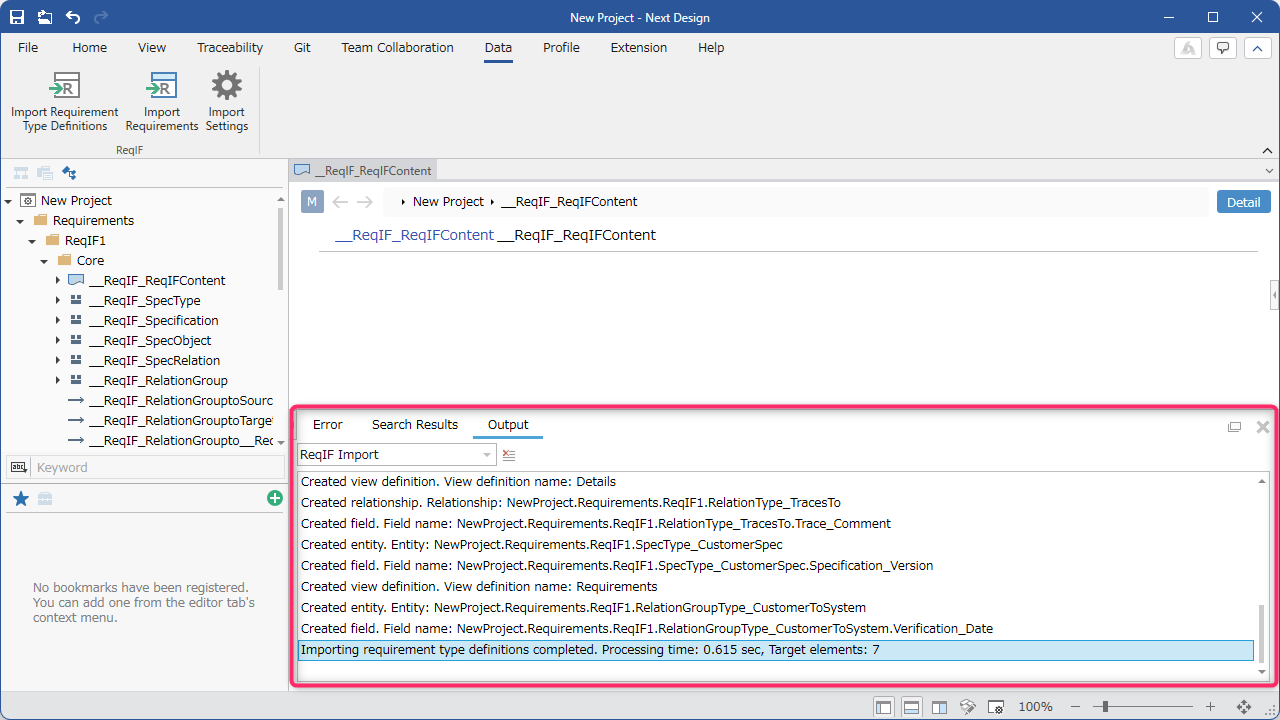
Information about metamodels and view definitions created or updated using "Import Request Type Definitions" is output to the [ReqIF Import] category in the output tab.
-
If the metamodel or view is not reflected after performing a type definition import, check the output tab first.
-
When the import is complete, a completion message will be output.
-
If you selected [Yes] in the delete confirmation dialog during an update import, the full path of the deleted model will be output.
-
If you select "No" in the delete confirmation dialog during update import, you will be notified of the models that are candidates for deletion.
Error List
If a model cannot be created or updated due to reasons such as the absence of a corresponding metamodel, an error (warning) will be registered in the model.
-
Please check if you have executed "Import Required Type Definitions" first.
-
After resolving the error, please import again.