D7. Check Traceability
In the sample project of this package, the following trace settings information is pre-registered so that you can quickly switch the [Trace Set] of the trace page according to your purpose. By using the trace page, you can check traceability at any time, and by checking at the end of the design or process, you can minimize rework.
| [Trace Set] Options | Description |
|---|---|
| System Requirements ~ Software Requirements | You can check the traceability between system requirements and software requirements. |
| Software Requirements ~ Component Specifications ~ Unit Specifications | You can check the traceability from software requirements to units. |
| Software Component Design ~ Software Component Testing ~ Test Results | You can check the traceability of tests against component designs. |
| Software Architecture Design ~ Integration Testing ~ Test Results | You can check the traceability of tests against architecture designs. |
| Software Requirements ~ Software Tests ~ Test Results | You can verify the traceability of tests against software requirements. |
| Software Components: Software Architecture Design → Software Component Design | You can verify the traceability of architecture design and component design. |
Trace setting information can be freely added. For details, please refer to "User's Manual > Modeling > Traceability Check > Switching and Saving Traceability Check Targets".
- Trace page screen image
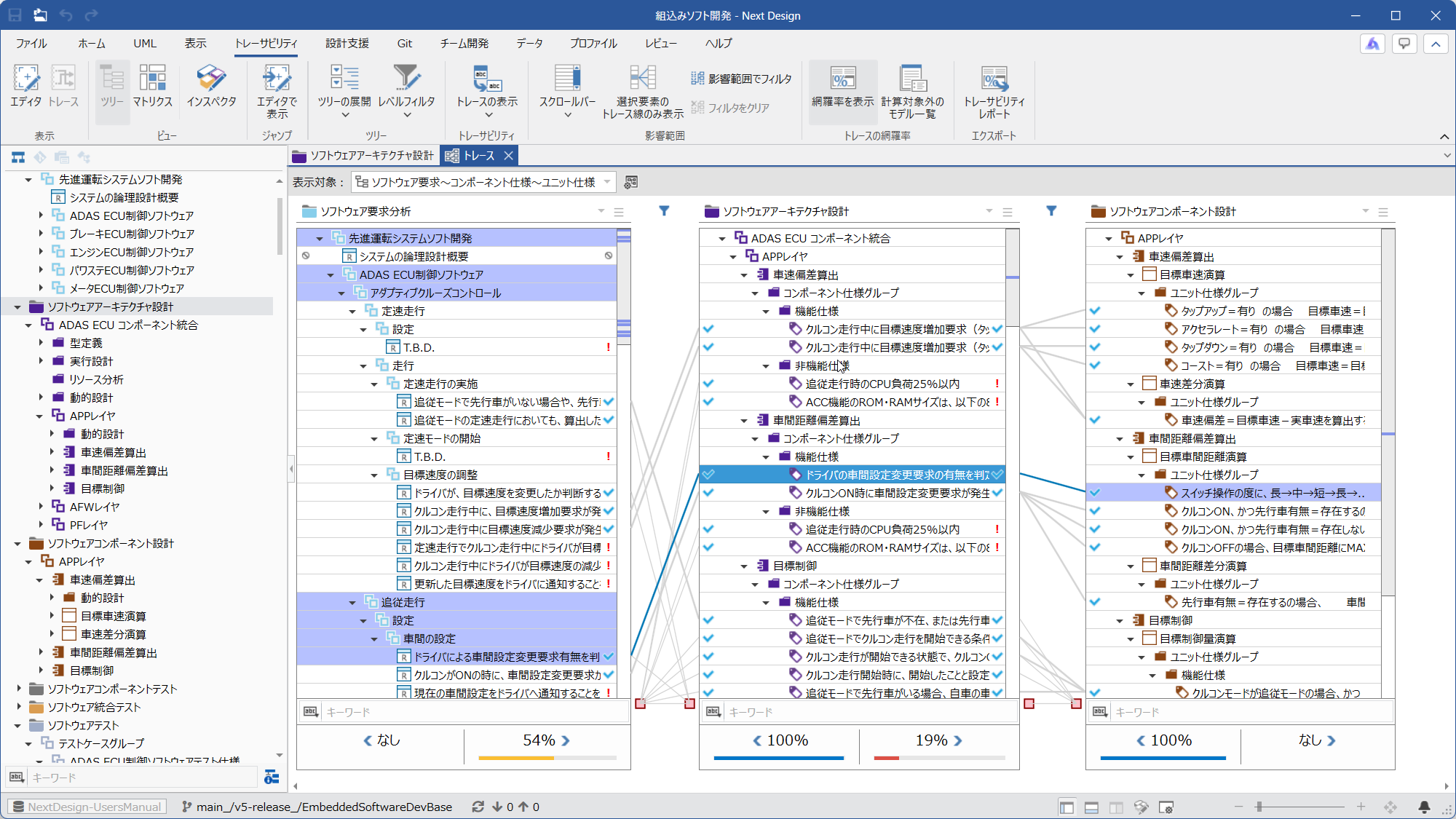
Between trace lanes, related filter conditions are set as needed to determine which items to display.
For example, in the metamodel of this package, [Software requirements] is defined to have the following two types of derivation relationships.
- [Software requirements] and [ComponentSpecification]
- [Software requirements] and [Test case]
Where [Software requirements] and [ComponentSpecification] appear side-by-side as trace lanes on the trace page, a filter is applied to display only the former of the two derivation relationships.
This setting ensures that the coverage rate of [Software requirements] is not affected by the presence or absence of [Test case].
For details, please refer to "User Manual > Modeling > Traceability Check > Switching and Saving Traceability Check Targets > Specifying Trace Lines to Check".